
Player Leaderboard
Player Leaderboard provides a complete, free workflow for managing sports rankings in WordPress. Administrators create competitions, add players or teams, enter results and publish the calculated tables on any page or post.
The plugin supports singles, doubles and team competitions. Standings use configurable points for victories, defeats and draws. Individual and doubles rankings can take opponent strength, bonuses and rating history into account.
There is one free edition of Player Leaderboard. No premium edition or paid feature gate is required.
Features
- Create singles, doubles and team competitions.
- Manage players or teams and their contact information.
- Record one result or up to ten results at once.
- Configure points, sets, ratings, bonuses and ranking behaviour.
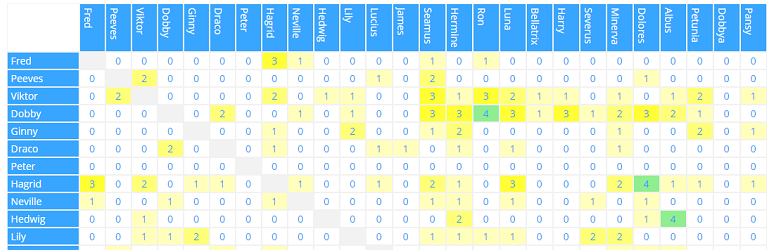
- Display standings, rankings and duel matrices on the front end.
- Optionally show result-detail dialogs.
- Import and export competitions, players and results as CSV.
- Configure table and matrix colours per competition.
- Use responsive, horizontally scrollable tables without clipped columns.
- Read expanded context-sensitive help and workflow guides while editing a competition.
- View complete shortcode documentation in the competition overview and directly below the editor help.
Basic workflow
- Open Player Leaderboard in the WordPress administration area.
- Create a competition and select its type and scoring rules.
- Add the participating players or teams.
- Enter the match results.
- Copy the shortcode shown in the competition list to a page or post.
Shortcode
The competition ID is required:
[player_leaderboard id="1"]
Available attributes:
id– Numeric competition ID. Required.mode– Output type:standing(default),rankingormatrix.showheader– Set totrueto show the competition title and view heading. Default:false.details– Set totrueto make standing or matrix values open result-detail dialogs. Default:false.view– Ranking calculation shown for doubles:points(default),quotient,rating,ratingsoraverage.type– Matrix value:games(default),sets,pointsorrating.matrix_font_size– Matrix font size in pixels from8to32. If omitted, the responsive default size is used.fontweight– Legacy responsive matrix font-size factor from1to500. Default:100.width– Minimum matrix width with a supported CSS unit, for example100%,720pxor50rem. If less space is available, the matrix becomes horizontally scrollable. Default:100%.
Examples:
[player_leaderboard id="1" mode="standing" showheader="true" details="true"]

[player_leaderboard id="1" mode="ranking" view="average"]

[player_leaderboard id="1" mode="matrix" type="sets" details="true" matrix_font_size="12" width="100%"]
CSV import and export
Use the CSV export generated by Player Leaderboard as the template for imports. A complete competition export can contain competition, player and result rows. During import you can choose whether existing rating values are reset and whether result rows are imported.
For security, CSV uploads are limited to .csv files up to 5 MB and are available only to administrators.