Ultimate Member Widgets for Elementor – Login Form, Register Form & User Directory
Turn your Ultimate Member site into a branded membership experience — without writing code
Ultimate Member Widgets for Elementor is the free Elementor addon built specifically for Ultimate Member membership sites.
If you run a community, association, school, marketplace, or any site where people sign up and log in, you already know the problem: Ultimate Member handles users brilliantly, but the default login page, register form, and member directory rarely match your brand. They look generic. Visitors notice.
This plugin fixes that. Drag widgets into Elementor, change colors, fonts, spacing, and layouts visually, and publish. No CSS files. No shortcodes. No child theme edits.
You get a setup wizard on activation, one-click starter templates for your core pages, and a Member Pages dashboard that maps your login, register, account, and profile URLs — then opens each page in Elementor with one click.
Works with the free version of Elementor. Elementor Pro is not required.
Live Demos | Go Pro | Documentation
Why site owners install this plugin
- Look professional from day one — Branded login and register pages build trust before members even sign in.
- Help visitors find members fast — Searchable, filterable member directories update live as people type. No page reloads.
- Start quickly, even if you are new to Elementor — The setup wizard checks requirements, applies starter designs, and opens your pages in the editor.
- Stay in control visually — Every button, input, card, and label is styled inside Elementor. Change your mind later without touching code.
- Grow when you are ready — The free plugin covers login, register, password reset, directories, and basic profile fields. Upgrade to Pro only when you need profile builders, account pages, tables, or carousels.
Style login, register, and password reset in Elementor — free
Your login page is the first thing every member sees after signing up. Make it feel like your site — not a plugin default.
Login / Register Form — One widget handles both forms. Drag it onto your login or register page, pick Login or Register in the Content tab, and style inputs, labels, buttons, backgrounds, typography, padding, and shadows. Arrange fields in multi-column rows, reorder them, hide labels, and control column gaps — all without breaking Ultimate Member’s validation. Works with any UM form. Step-by-step login tutorial
Password Reset — Style the Ultimate Member password reset page to match your login and register forms. A consistent sign-in flow means fewer confused visitors and fewer abandoned password resets.
Logout — Add a styled logout link for logged-in members. Uses your UM logout page when configured.
Build a searchable member directory in Elementor — free
Help visitors browse, search, and discover members on your site.
Directory Grid — Display Ultimate Member users in a responsive card or list layout. Visitors search by name and results update instantly (AJAX live search). Filter by user role or custom UM profile fields — up to two filter fields in the free version. Choose numbered pagination, Load More, or Infinite Scroll. Set one to six responsive columns. Sort by display name, registration date, last login, post count, or any custom field. Show only approved UM members with one toggle. Design each member card with a custom Elementor template for full creative control. Live demo | Directory tutorial
WordPress Users — List native WordPress users by role with any user meta field. Perfect for team pages, staff directories, and contributor lists. Works without Ultimate Member installed.
Flip Cards — Hover-to-flip profile cards that reveal a second set of fields on the back. A memorable layout for team showcases and member spotlights. Live demo
Profile widgets for Ultimate Member pages — free
Build cleaner profile layouts on member profile pages.
Profile Photo — Standalone avatar widget with border, radius, size, and CSS filter controls.
Profile Fields — Show any combination of Ultimate Member profile fields for the member being viewed. Supports text, URL, phone, image, and file field types. Control who sees each field with visibility rules. Live demo
Profile Name — Output the profile user’s name in any format (display name, first name, last name, full name, username, or nickname) with full Elementor typography and color controls. Live demo
UM Visibility — Show or hide any nested Elementor content based on login status, user role, or field value conditions. Great for member-only sections on profile pages.
Get started in minutes — setup wizard and starter templates
New to Ultimate Member and Elementor? You are not alone.
- Activate the plugin — A guided setup wizard opens automatically.
- Check requirements — The wizard confirms Elementor and Ultimate Member are ready and your core pages are mapped.
- Apply a starter template — One click adds a polished layout to your Login, Register, Password Reset, or Members Directory page.
- Open in Elementor — Fine-tune colors, fonts, and spacing, then publish.
Your previous layout is backed up automatically before any starter template is applied. Restore it anytime from the Member Pages screen.
Find widgets in the Elementor panel under UM Member Pages (forms and profile fields) and UM Member Directories (directory grids and flip cards).
Everything included free
- Style UM login, register, and password reset forms in Elementor
- AJAX live search on member directories — results filter as visitors type
- Role and custom field filters — up to two filter fields in Directory Grid
- Card, list, and custom template layouts with full Elementor style controls
- Three pagination modes — numbered pages, Load More, or Infinite Scroll
- Show only approved Ultimate Member users, or list all WordPress users
- High-performance query engine enabled by default with smart cache invalidation
- Member Pages screen — map UM core pages and open them in Elementor
- Setup wizard and starter templates — go live faster without starting from scratch
- Field layout controls on login/register forms — multi-column rows, reorder, hide labels
- Per-field visibility rules — show fields to everyone, logged-in users, or specific roles
- Works with free Elementor — Elementor Pro is not required
Upgrade to Pro when you need more
The free plugin covers authentication pages and member directories. UM Elementor Pro unlocks every remaining Ultimate Member page:
- Member Carousel — Touch-friendly slider for featured members, alumni spotlights, or testimonials
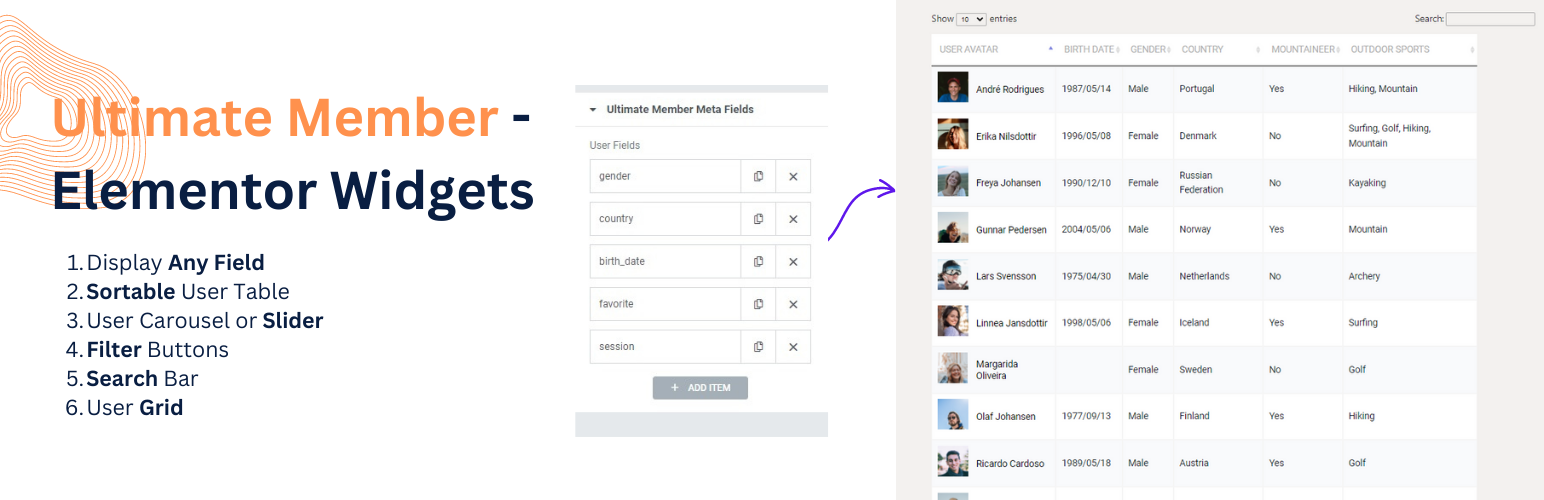
- Member Table — Sortable directory with clickable column headers, global AJAX search, and CSV export. Tutorial
- Member Filter — Standalone filter panel with unlimited fields, dropdowns, checkboxes, and radio buttons
- Member Card Grid — Multi-column and zigzag directory layouts
- Member Search — Dedicated AJAX search bar, independent of the directory grid
- Faceted Search — Multi-criteria live filtering with real-time AJAX refresh
- Account Page — Style Ultimate Member account tabs (General, Password, Privacy, Notifications) in Elementor
- Profile Page Builder — Replace the default UM profile template with a custom Elementor layout: cover photo, header, bio, meta fields, social links, action bar, completion bar, custom tabs, and profile body. Tutorial
- UM Directory Styler — Full Elementor visual control over the native Ultimate Member directory shortcode
- Member Loop Grid, Split View, and Alphabet Index — Advanced directory layouts with Elementor templates, side-panel browsing, and A–Z name navigation
See all Pro features and live demos →
Pricing: Free — unlimited sites. Pro — $45/year.
Do not activate Free and Pro together. Pro replaces Free.
What users say
“I have been seeking sortable user data tables for quite some time. Finally found it.” – ★★★★★ @nikotor · WordPress.org
“I am new to Elementor and WP and this plugin has been a real help. Takes a lot of guesswork and effort out of the process.” – ★★★★★ @hawkekeye · WordPress.org
Who is this for?
- Membership site owners who want a branded Ultimate Member login page — not the default template
- Community builders creating searchable, filterable member directories in Elementor
- Beginners who want a guided setup instead of figuring out shortcodes and page assignments alone
- Agencies building Ultimate Member client sites with full visual control and no custom code
- Schools and associations that need staff directories, faculty listings, or member rosters
- Marketplaces where visitors browse, search, and filter service providers or contributors