

certifcate issue
-
when you search my website cashbuyersnationwide.com – an error comes up (below)
(I tried the SSL setting under users that is recommended but it is not on my users personal information.)Thank you.
There is a problem with this website’s security certificate.
The security certificate presented by this website has expired or is not yet valid.
Security certificate problems may indicate an attempt to fool you or intercept any data you send to the server.
We recommend that you close this webpage and do not continue to this website.
Recommended iconClick here to close this webpage.
Not recommended iconContinue to this website (not recommended).
More information More informationThe blog I need help with is: (visible only to logged in users)
-
Hi Brian,
That is actually very standard behavior and is a bit misguided (sorry about the scare!). Please note that only you and other registered users of the blog will see it when logged in.
When you connect to your Dashboard over an HTTPS connection, we use an SSL certificate to encrypt your connection. SSL certificates need to be signed to a specific domain, and we can’t provide certificates for every mapped domain, so our certificate is signed for WordPress.com.
When you connect to your Dashboard via your own domain but your security software sees a certificate signed to http://wordpress.com/ it’s altering you that WordPress.com may be intercepting your connection, which of course is perfectly fine.
To prevent your readers running into this in their browsers, just make sure that whenever you provide a link to your blog or post it anywhere, that you post it as http:// and not https://.
You can read more about this here.
-
Hello – that didnt solve the problem – I had a few people check it both ways and they get the same errors. Please advise? Thank you
-
Hello – that didnt solve the problem – I had a few people check it both ways and they get the same errors. Please advise? Thank yo
-
Hi there,
Can you take a screenshot of the URL and the security certificate? You can upload that to your Media > Library page. I will be able to see it from there.
Also, do you have any type of firewalls set up?
Thank you!
-
-
Hi there,
No, I’m not seeing any errors. If you are still seeing it, please upload a screenshot with the URL in to your Media > Library.
Thank you!
-
I uploaded it, its there. If you can’t see the screen shot then please send me your email address so i can send that way – my website has been down for WAY too long. Please help me – thank you
-
Please upload it here:
https://nationwideinvestorsgroup.wordpress.com/wp-admin/upload.php
It is not there. Also note, your site is not down as seen here:
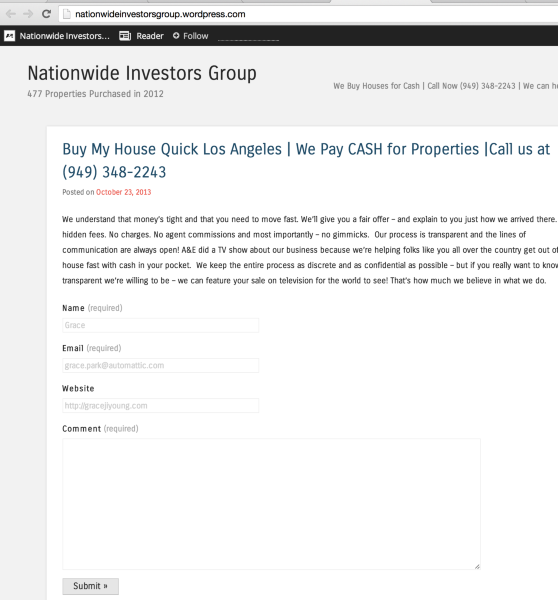
You should only be seeing that warning at https. You shouldn’t see it when you go here:
-
Ok – I see the problem – You are looking at the wrong website/account. I just uploaded to this account as well so you can see the error but the problem I have is with my other account
account: pascal77
Website: http://www.cashbuyersnationwide.com -
Hi Brian,
Please note that is not a WordPress.com site. You’ve reached support for the free sites hosted at WordPress.com. Your site at http://www.cashbuyersnationwide.com is hosted elsewhere using the free WordPress software available here:
Because your site is self-hosted with a different provider, support staff at WordPress.com do not have access to your site’s files or the ability to provide support for your current issue.
You can find support for your self-hosted WordPress site here:
If you need professional help for your self-hosted WordPress site, please check out:
You may also wish to contact your host’s support team for more assistance.
-
Its not letting me login to that support you gave me. So I reset the password and it never came because it said account was set up in 2011 and that is going to an old email address. I am really really really really really about to lose it. I really need your help and I dont understand when I login from one url the login and password work and from another url.
I AM SO CONFUSED – CAN YOU PLEASE CALL ME and walk me through this??????
-
Again, this is not a WordPress.com site, so I have no access to that sites’ files, logins, etc. Please contact your host as they would be the ones who would have access to all your files, logins, etc.
-
I cant reach them – when I click on the link you gave me it ask for my login and password – it doesn’t work / this is driving me crazy
can you take over my computer or anything like that? -
I’m sorry, but that wouldn’t be possible as I don’t have access to your computer either. Considering that it is past 10 pm on the East Coast, they may respond tomorrow morning (I’m not sure – it’s a complete guess).
However, if it helps, just note that your site is not down, you’re just having a security certificate issue. If you click Advanced and proceed anyway, you can still see your site. When your host gets back to you they can help you with this.
-
-


- The topic ‘certifcate issue’ is closed to new replies.


 WordPress.com Forums