

Domain transfer timing
-
Hi I’m building a new website for a new employer. I want to leave the current site up and running until I’m ready to cut over to the new site, which I haven’t begun work on yet. Can I transfer the domain over to WordPress now and the current site will remain uninterrupted or should I wait until I am ready to switch over.
-
You’ll be able to build the site under the free subdomain we provide, you won’t need to add the custom domain until you’re ready.
For that, we have two options:
Mapping allows you to keep the domain registered with your current domain registrar and direct it to your WordPress.com site: https://en.support.wordpress.com/domains/map-existing-domain/
A transfer would allow to manage both your site and domain from the same place: https://en.support.wordpress.com/move-domain/incoming-domain-transfer/
-
-
But we still have to BUY a wordpress plan, right? I’m not finding any free plans! I just want to build the site at the moment and have my partner review it.
-
A paid plan is required to use a custom domain, but you can start a free site and add a plan to it later.
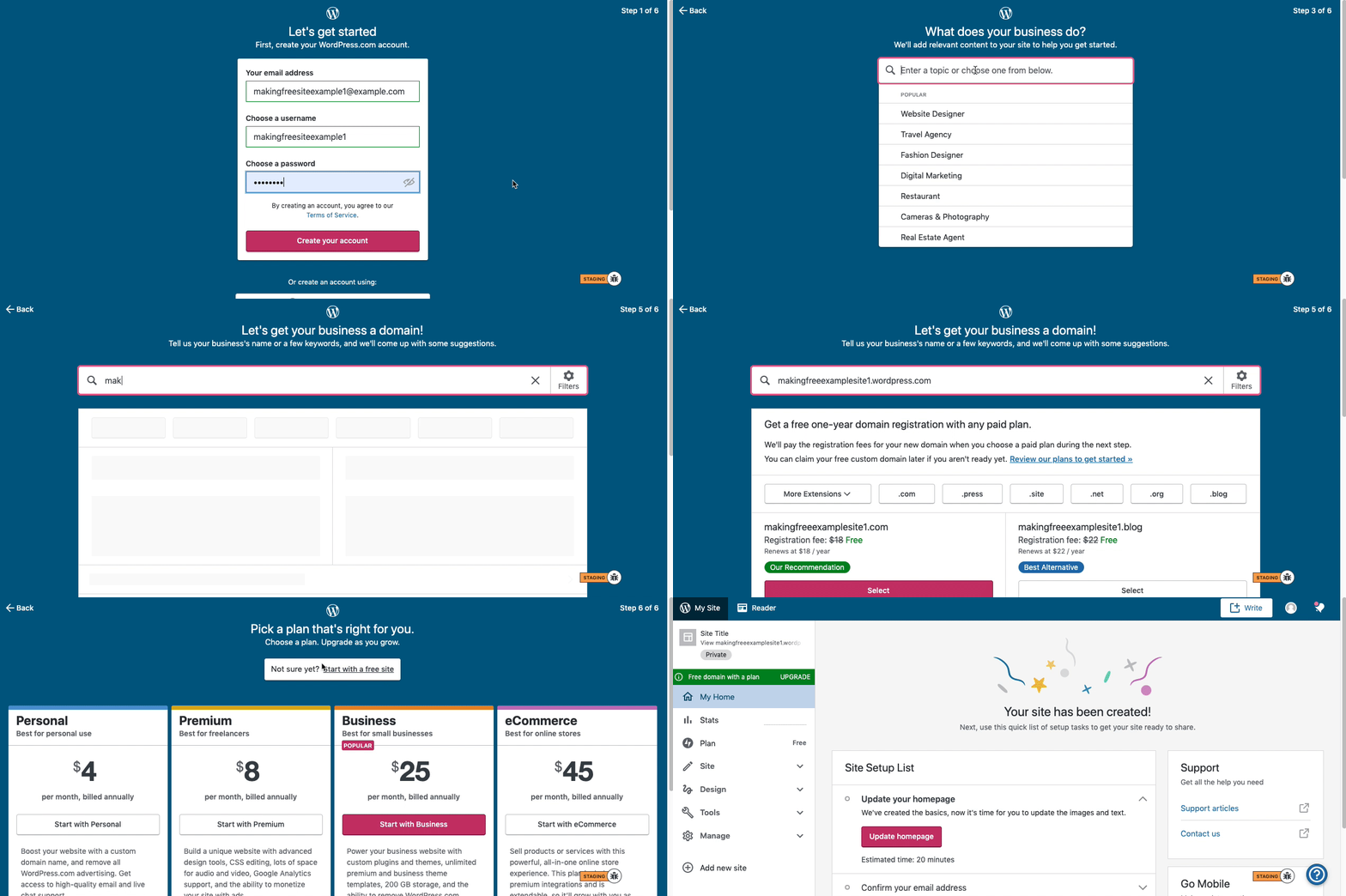
Here is visual instructions on how to create a free
.wordpress.comsite:Step 1: Select email, username, and password.
Step 2: select Blog for a.home.blogfree site or Business for a.wordpress.comsite.
Step 3: Select the Topic of your site.
Step 4: Type in the Title of site (optional).
Step 5: Type in the full, exact site address you want including the.wordpress.comor.home.blogsubdomain (ex:freeexamplesite.wordpress.com,freeexampleblog.home.blog). The first option should be the free site that you manually typed in. Click select next to that option.
Step 6: At the very top, click the link that says: start with a free site.Then, your free site should be created! Please follow those steps and if you have any questions, let us know. Thanks!


- The topic ‘Domain transfer timing’ is closed to new replies.
 WordPress.com Forums