

Editing Standard Message Used In Publicize Feature
-
I do not see the box that should allow me to customize my message in the Publicize box.
The blog I need help with is: (visible only to logged in users)
-
Hi there,
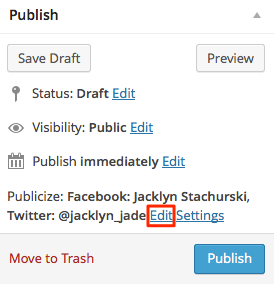
You can customize the Publicize message from the post editor in your blog’s dashboard. In the Posts section there, you can add a new post or edit a post draft. In the post editor for the post, there will be a Publish module with the option to edit the message, as shown here: Publicize
Please let me know if you have any questions about that. :)
-
Thanks for your response. I am trying to add something a more appealing than the “Visit the post for more” statement that accompanies my post handled by Publicize. Is it possible?
-
Hi there!
It doesn’t look like you have any Publicize connections set up. Once you have connections enabled through Settings > Sharing, you’ll see a link to Edit your Publicized message.
Where are you seeing “Visit the post for more”?
-
I am seeing the “visit post for more statement” in the banner that accompanies the image on FB posts handled by the Publicize feature that sends my blogs to FB and LinkedIn. I can edit the wording if I post myself but see no way to edit this consistently and automatically.
-
Thanks for the screenshot! That filler text is inserted because the only content in your post is a video. You can avoid that text appearing by adding some text to your post.
Since there is no content for Facebook to display, it automatically displays “Visit the post for more” as filler text.
Does that make sense?


- The topic ‘Editing Standard Message Used In Publicize Feature’ is closed to new replies.
 WordPress.com Forums