

Embedded media player
-
After pasting in a sound file, its showing the whole url underneath the player. It did not do this before. How do I get rid of this?
The blog I need help with is: (visible only to logged in users)
-
Hi there!
Can you point me to a post where this is happening? What kind of sound file are you trying to link to? Is it a Youtube or other embedded player? Or is it a file you’ve uploaded to your WordPress.com Media Library?
Looking forward to your response!
-
I have several posts where this occurs. Here is one:
http://messingskolen.net/2014/03/23/3-leksjon-mer-spilling/If you see on the first sound clip, the url is not showing, but in the second its showing. And I have no idea why!
Thank you if you can help me solve this!
Rune -
Earlier the player was smaller and more unnoticeable (is this the right word??). Now its bigger and darker. Do I have some option on how the player may occur on my page?
-
Hi there!
I just took a look at your post. It looks like one of your shortcodes was hyperlinked:

I removed this hyperlink and everything looks fine now.
Earlier the player was smaller and more unnoticeable (is this the right word??). Now its bigger and darker. Do I have some option on how the player may occur on my page?
You’re right, we did recently update our audio player to be more inline with the core WordPress functionality. There is less control via the shortcode, but you can edit their size and look via CSS now.
If you want some help with that, head over to the CSS forums!
https://en.forums.wordpress.com/forum/css-customization
Let me know if I can help with anything else! :)
-
Thanks with this particular post, but I have a lot of other posts that has the same issue. Is there anything I have done wrong that brings up these hyperlinks? Or anything I can do to get rid of these?
Rune
-
I’m not sure what would have recently triggered your posts to have hyperlinks. Sometimes this can happen if you insert the shortcode through the Visual editor instead of the Text editor.
Unfortunately, the only way to fix these is to open each post individually and remove the hyperlinks.
-
-
Sure! Just open one of the posts in the editor and find the hyperlinked text. Then just put your cursor somewhere in the middle of the link like shown with arrow 1:
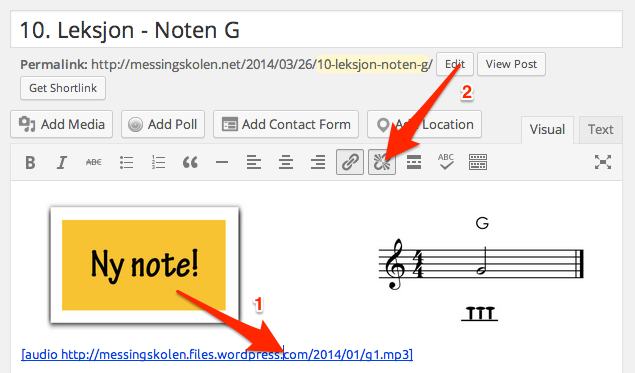
Then click the unlinking button which I’ve pointed out with arrow 2.
http://en.support.wordpress.com/links/#removing-links
Let me know if I can help further!


- The topic ‘Embedded media player’ is closed to new replies.
 WordPress.com Forums