

Free plan
-
-
Hi There.
I have had a friend of mine deal with this problem. If you mean that when you want to launch your site it asks you to pay then probably you have something that needs to be paid in your cart. try emptying your cart and proceed. I hope this is correct
-
Hi there,
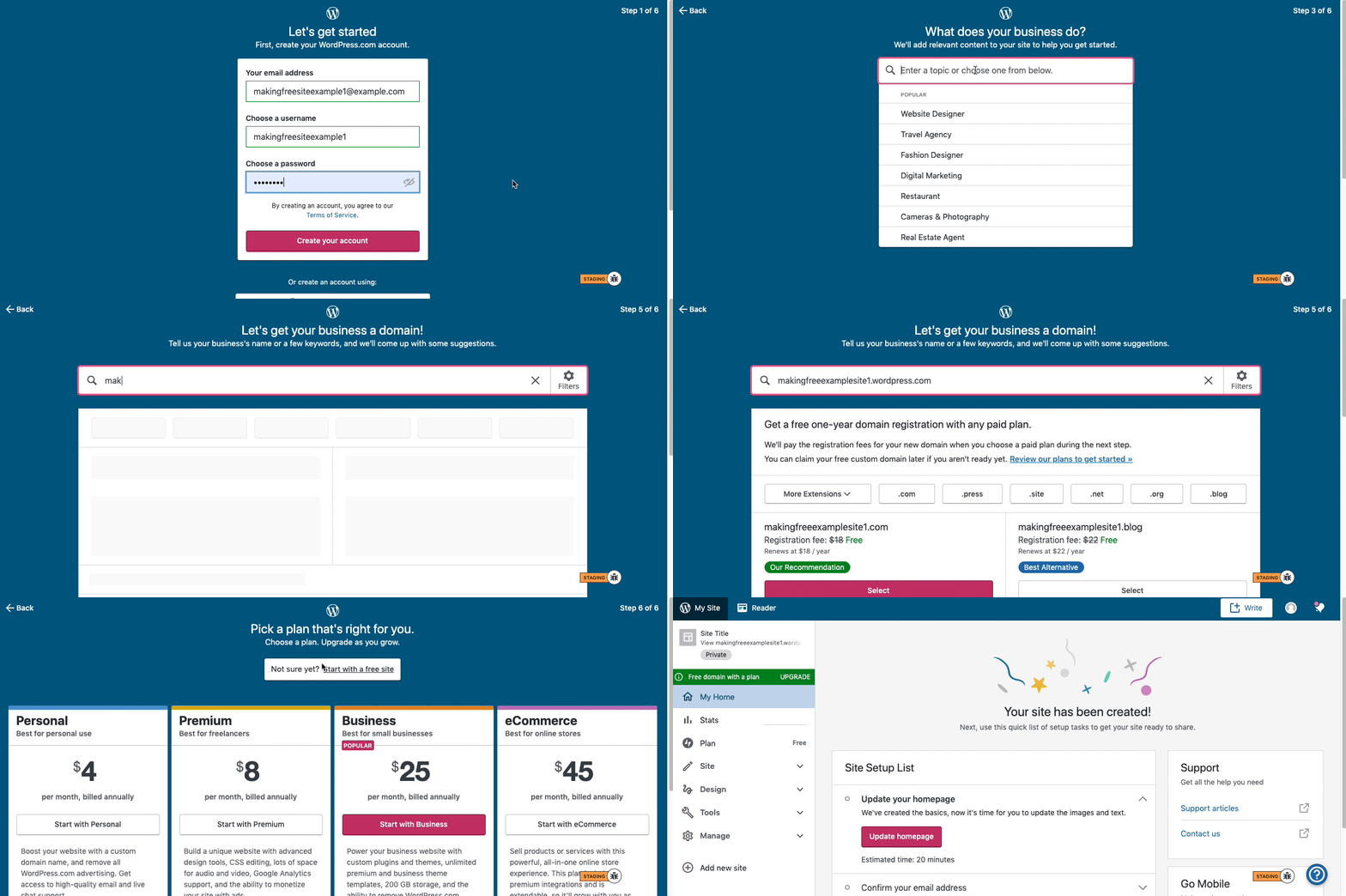
Here are visual instructions on how to create a free
.wordpress.comsite:Step 1: Select email, username, and password.
Step 2: select Blog for a
.home.blogfree site or Business for a.wordpress.comsite.Step 3: Select the Topic of your site.
Step 4: Type in the Title of site (optional).
Step 5: Type in the full, exact site address you want including the
.wordpress.comor.home.blogsubdomain (ex:freeexamplesite.wordpress.com,freeexampleblog.home.blog). The first option should be the free site that you manually typed in. Click select next to that option.Step 6: At the very top, click the link that says: start with a free site.
Then, your free site should be created!
Please follow those steps and if you have any questions, let us know.
Thanks!


- The topic ‘Free plan’ is closed to new replies.
 WordPress.com Forums