

Help to create my Free wordpress Blog
-
Hi Team,
I am trying to set up my wordpress blog from past few days but it’s very confusing to me as a beginner. Is there any documentation that helps me through step by step process of creating blog from end to end please
It helps me a lot -
Hi there,
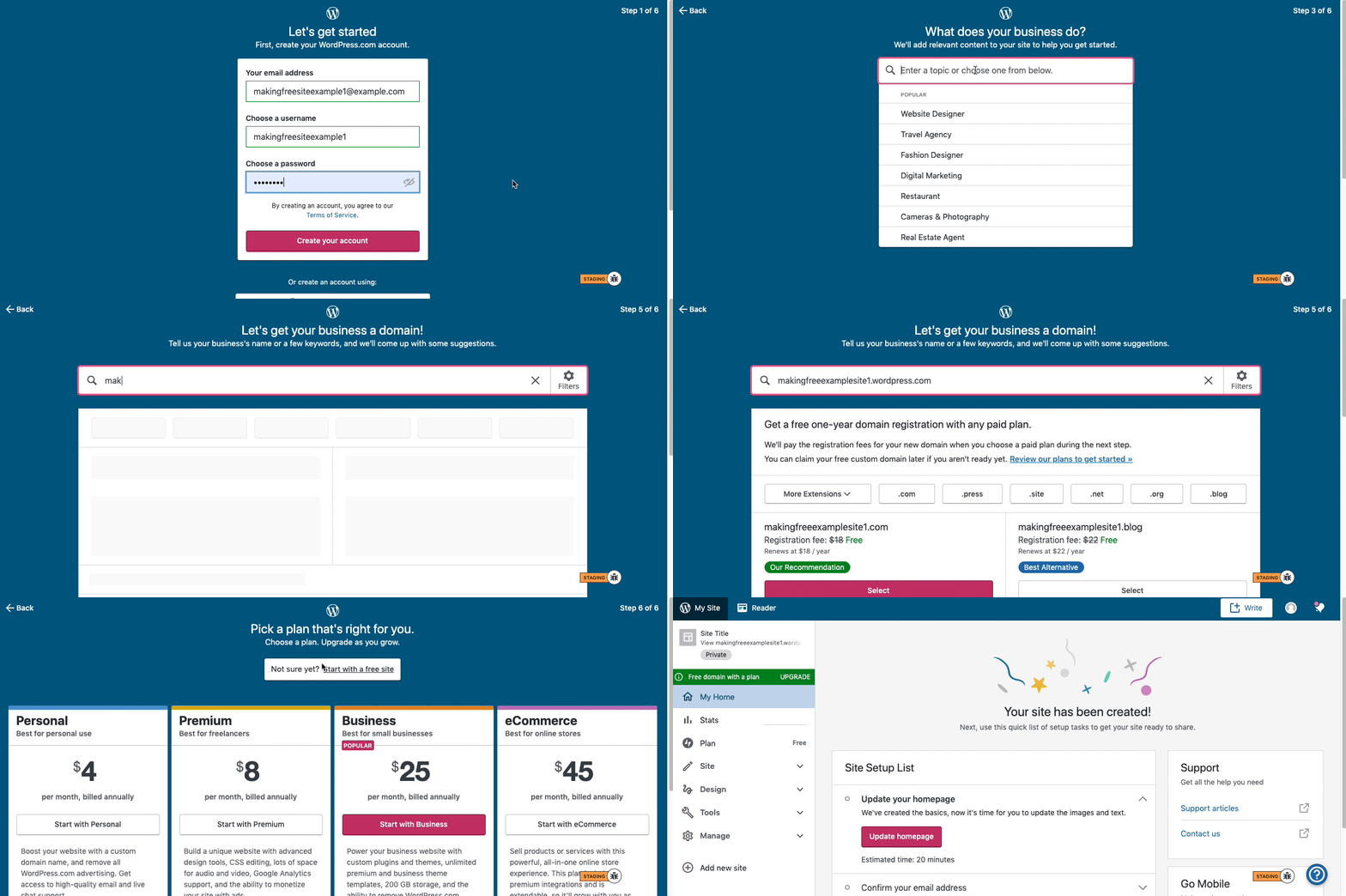
Here are visual instructions on how to create a free
.wordpress.comsite:Step 1: Select email, username, and password.
Step 2: select Blog for a
.home.blogfree site or Business for a.wordpress.comsite.Step 3: Select the Topic of your site.
Step 4: Type in the Title of site (optional).
Step 5: Type in the full, exact site address you want including the
.wordpress.comor.home.blogsubdomain (ex:freeexamplesite.wordpress.com,freeexampleblog.home.blog). The first option should be the free site that you manually typed in. Click select next to that option.Step 6: At the very top, click the link that says: start with a free site.
Then, your free site should be created!
Please follow those steps and if you have any questions, let us know.
Thanks!


- The topic ‘Help to create my Free wordpress Blog’ is closed to new replies.
 WordPress.com Forums