

How can I stop the subscription widget from displaying my email address?
-
I am using the jet pack subscriber widget. The widget displays a message that people can subscribe to the blog by email. In the tab where readers insert their email address, my email address is displayed. I do not want it displayed publicly and have tried everything to delete it but without success. Can you help?
The blog I need help with is: (visible only to logged in users)
-
Hi there!
I understand your concern here. This is likely being auto-filled with your WordPress.com email address for convenience, but can you give me a link to the site in question so I can take a look?
-
Hi Shawna,
My site is http://www.sidesofunny.com.
I’m just building it and have not started to publicize it yet. It will replace another site when it’s ready to go public. I also find that the site is unresponsive to some settings changes. For example, I’d like the author name from posts and be deleted and have made this change on the “screen options” tab but got no response. Also, I unchecked the “show number of subscribers” box in the jetpack subscription widget but again no response.
But my main concern is the autofilling of my email address. Would much appreciate your advice. Thanks.
-
Thanks for getting back to me! Here’s what I see in the email form:
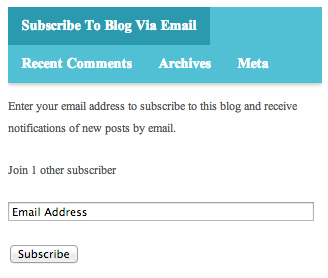
No email address! Your browser is probably autofilling it for you. So no worries! :)
I also find that the site is unresponsive to some settings changes. For example, I’d like the author name from posts and be deleted and have made this change on the “screen options” tab but got no response. Also, I unchecked the “show number of subscribers” box in the jetpack subscription widget but again no response.
Unfortunately, I can’t help entirely here since I don’t have access to your site, but let’s see if any of this helps.
The Screen Options tab just removes things from display on the dashboard pages. Not on your actual site. If you’d like to hide author names on your site, you’ll have to do it using CSS. Here’s some code that should work:
.fa-user {
display: none;
}
As for the Jetpack subscription widget, I don’t have any great suggestions other than ‘make sure you saved your changes’?
If you continue to have issues with your self hosted site, you should check out the WordPress.org support documents and forums:
If you need professional help for your self-hosted WordPress site, you can check out:
I hope that helps!
-
Thanks Shawna, much appreciate your feedback. I never thought of the browser as the source. Also thanks for your suggestions which I will follow up.
-
I’m happy to help! Let me know if there’s anything else I can do.
Have a great weekend. :)


- The topic ‘How can I stop the subscription widget from displaying my email address?’ is closed to new replies.
 WordPress.com Forums