

New edit layout not working.
-
Hi,
The layout in “editing” seems to have changed a lot. I no longer have a word count, I can’t send a link to a friend for proofreading, and worst of all, I can’t change from “Private” to “Public” and I can’t “Publish.”
Thx for the help.
The blog I need help with is: (visible only to logged in users)
-
Hi there!
I’m sorry you’re having trouble with our new editor. Let’s see if we can get you straightened out. :)
I no longer have a word count
We’ve had a few users request that this be added. I’ll add your voice to the mix.
I can’t send a link to a friend for proofreading
Thanks for mentioning that you’d like this feature added. I’ll pass this along to the developers.
I can’t change from “Private” to “Public” and I can’t “Publish.”
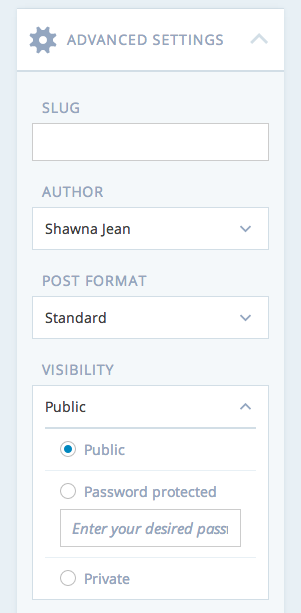
You an change from Private to Public in the sidebar. You’ll find this setting under “Advanced Settings”:
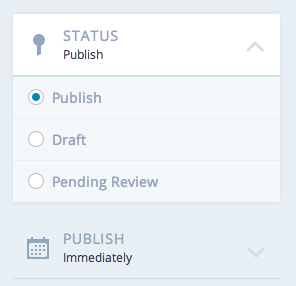
You’ll find the option to set your post from Draft to Publish at the top under “Status”:
Then, the “Publish” or “Update” button is at the very bottom:

Let me know if I can help further!
-
-
We’re working to unify the editing experience for our users. The classic mode is obviously still available currently, however I can’t speak to when or if it will be removed.


- The topic ‘New edit layout not working.’ is closed to new replies.
 WordPress.com Forums