

Pages
-
I am using the Illustratr theme and my published pages are not visible. After publishing them there is nothing showing up on the homepage.
The blog I need help with is: (visible only to logged in users)
-
-
Hi there!
I just visited your site and I’m seeing your post display there. Are you still having trouble with this?
-
Hi!
Yes I am still having trouble.There is no issue with the posts, those show up. The issue I am having is in creating ‘Pages’ and having those be visible on the blog. I want to create an ‘About’ and ‘Contact’ page but every time I create and publish a page it shows up in my dashboard but never on the actual blog.
I am also having trouble setting up a ‘Portfolio’ page to display all of the brands I feature with the portfolio page template.
Any help is greatly appreciated.
-
I want to create an ‘About’ and ‘Contact’ page but every time I create and publish a page it shows up in my dashboard but never on the actual blog.
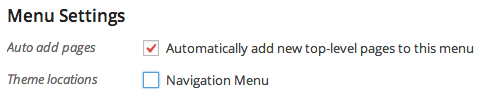
In order for your new Pages to display in your menu, you’ll need to add them through Appearance > Menus. If you’d like newly published Pages to automatically appear in your menu when you create them, you can check the box marked “Automatically add new top-level pages to this menu”.
I am also having trouble setting up a ‘Portfolio’ page to display all of the brands I feature with the portfolio page template.
I’m happy to help with this. What trouble are you having?


- The topic ‘Pages’ is closed to new replies.
 WordPress.com Forums