

Titles not visible
-
Before 11/08/2014 RSS titles were visible making it easy to add new widgets in an appropriate place. Now all are labeled RSS and the title is not shown.
The blog I need help with is: (visible only to logged in users)
-
-
On 11/08/2014 6:15 PM, WordPress.com Support Forums wrote:
a:hover { color: red; } a { text-decoration: none; color: #0088cc; } a.primaryactionlink:link, a.primaryactionlink:visited { background-color: #2585B2; color: #fff; } a.primaryactionlink:hover, a.primaryactionlink:active { background-color: #11729E !important; color: #fff !important; } /* @media only screen and (max-device-width: 480px) { .post { min-width: 700px !important; } } */ WordPress.com body { font-family: arial; font-size: 0.8em; } .post, .comment { background-color: white !important; line-height: 1.4em !important; } -
Hi there!
I just visited your site and I see titles for all of your RSS widgets. Are you still having trouble with this?
-
I am working on it as fast as I can for an octogenarian with only one working hand.
The software in WordPress allows me to run a series of blogs using a text enabler to an image blog that also allows me to link to another WordPress blog plus a bit of rss that allows me to automatically show and link to recent blogs plus the date of creation of each. All in all I manage though it would be useful for the widgets to show the name of the referred blog. At present I have to do so manually. It was a feature of WordPress older software.Cheers, Bill
-
Hi there!
I do see that each feed has a text title such as “ABORIGINAL”. Just to clarify, by ‘title’ do you mean the images you’ve added above each RSS feed?
-
The difficulty I face is on the ‘widgets page’. On the previous WordPress software the title was visible there to the administrator and I was able to navigate my way thereby much more easiy. To the visitor the Canbytes page was and is ok. Bill
-
Okay, I think I understand now. I just checked the widgets page in the Customizer and the widgets page at Appearance > Widgets and both are displaying the user-set titles for the RSS feeds.
It looks like some of your feeds don’t have titles set, so they don’t display. And none of your text widgets have titles, so there’s nothing for our system to display there either.
Does that clear things up?
-
-
Formerly, endowing an rss widget with a title resulted in that title appearing alongside ‘rss’ on the widget page. Now nothing.
-
Does consulting this guide help you?
http://en.support.wordpress.com/widgets/rss-widget/ -
-
Nothing new to see.
My problem is in an ‘rss’ box on the widgets screen’
Before the last change by WordPress a posted title appeared to the right of ‘rss’ in the appropriate box on the widgets screen. Now nothing.
-
-
Thanks for taking a look! Here’s what I see when I view your widgets in the Customizer:
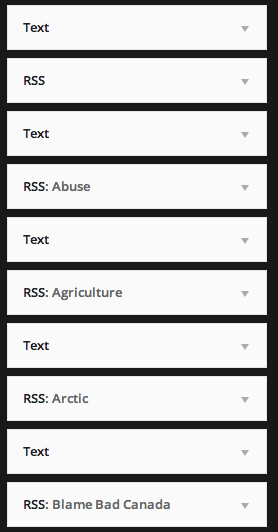
And here’s what I see at Appearance > Widgets:
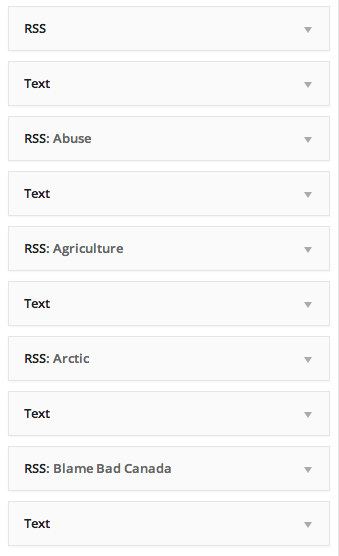
I see that most of the RSS widgets say something like “RSS: Agriculture”. Do you not see that?
-
I will describe what I do….
Browse to canbytes.com
See the main page complete (since I am admin) with admins top.
Use canbytes widgets command
See page with all the existing and makeable widgets
Look at the column that shows the existing ‘feature’ widgets
See boxes with ‘text’ or ‘rss’ which I should as they are the two widgets I use in the feature col.
Bummer , see both rss and text in boxes but no rss with no title to right whether I have included it or not.
Used to see rss title when I included it with previous WordPress software
NB… Much kudos to new software writer(s). I like it (Otherwise that is)
Bill (After I send this I will look to see that I have sent correct info so look for a later submission)
-
-
Thanks for that walkthrough!
Use canbytes widgets command
Just to clarify, does this mean you click on “Widgets” from the dropdown menu in the upper left corner?
It sounds like you’re in the same place as I was when I visited Appearance > Widgets. Can you please take a screenshot of what you’re seeing there and upload it to your Media Library?
-
Yes, it appears we are seeing similar pages. After I browse to canbytes.com whether I then use ‘Canada>widgets’ or ‘dashboard>appearance>widgets’ the page that comes into view is the same. I will set about the screen upload you requested. Bill
-


- The topic ‘Titles not visible’ is closed to new replies.
 WordPress.com Forums