

Trying/testing
-
Is there a way to do a test site, or a WP subdomain? I’m trying to evaluate options for a client, and I’m not going to set up a whole domain to do that.
I don’t have a site with WordPress.com yet
-
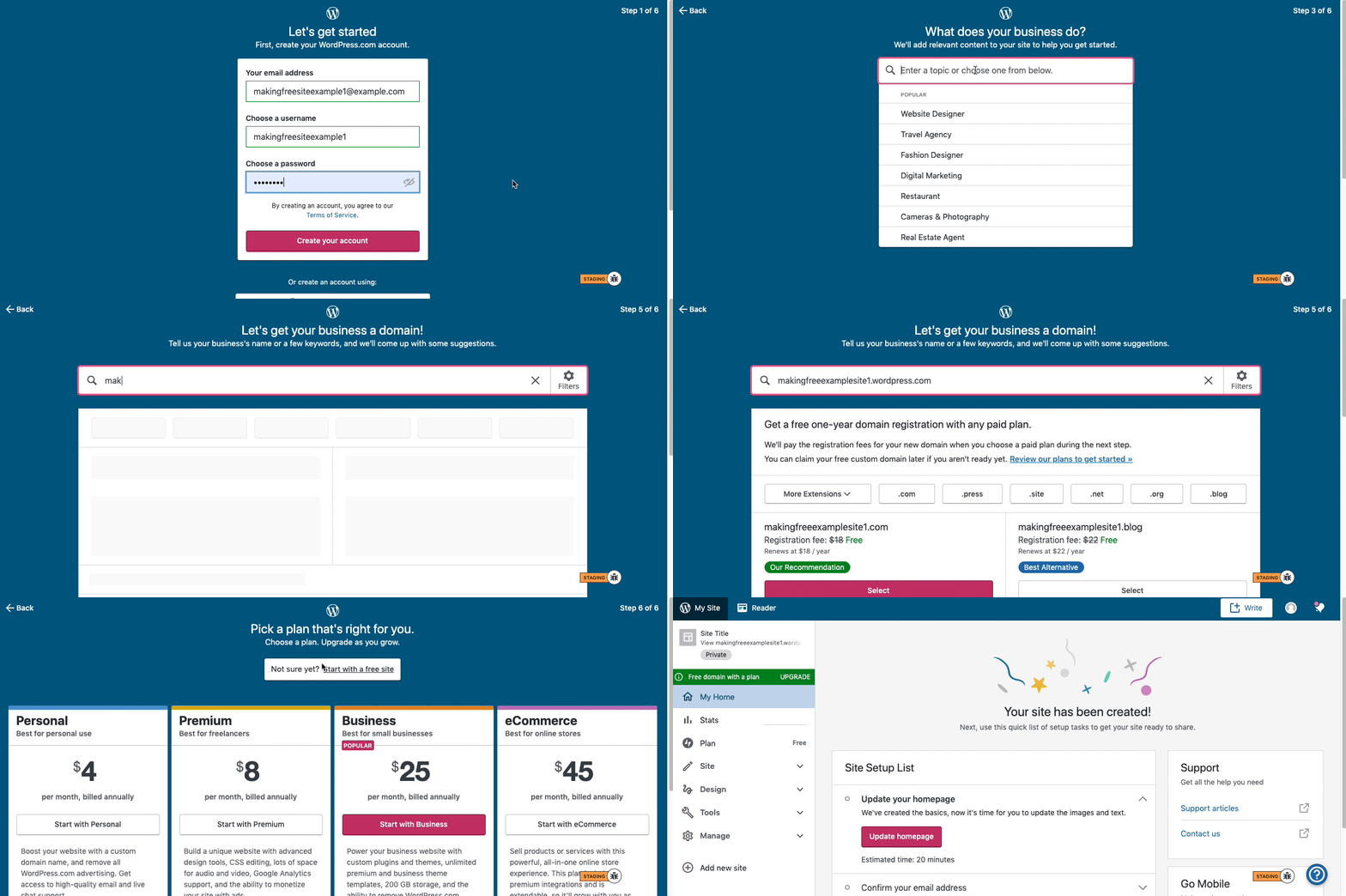
Here are visual instructions on how to create a free
.wordpress.comsite:Step 1: Select email, username, and password.
Step 2: select Blog for a.home.blogfree site or Business for a.wordpress.comsite.
Step 3: Select the Topic of your site.
Step 4: Type in the Title of site (optional).
Step 5: Type in the full, exact site address you want including the.wordpress.comor.home.blogsubdomain (ex:freeexamplesite.wordpress.com,freeexampleblog.home.blog). The first option should be the free site that you manually typed in. Click select next to that option.
Step 6: At the very top, click the link that says: start with a free site.Then, your free site should be created! Please follow those steps and if you have any questions, let us know.
-
I understand why, but they make finding the “just try it for free” options a bit obscure. I was about to give up on the payment screen for the same reason, but happened to notice the tiny “try for free” link at the top.
Anyway, thank you for the help.


- The topic ‘Trying/testing’ is closed to new replies.
 WordPress.com Forums