unauthorized blog notification
-
Today our subscribers received two notifications, about 10 hours apart, regarding a new blog on our website. Clicking on the blog – you get an error notification. On the back end – there is no blog in line waiting to be published, published or anything. The author of the blog – doesn’t exist so I *think* it had to be added.
So how do I reconcile this? Is WP experiencing random errors like this? Can we do something to upgrade the security on our blog? Is there a way to double check access on the blog? Thank you, CathyThe blog I need help with is: (visible only to logged in users)
-
Hi there,
Of what site are you speaking? The site at http://luvbugspeaks.wordpress.com/ is empty and there has been no activity on that site since it was created six years ago. There are no subscribers on that site.
This is the only site in this WordPress.com account.
-
I also can access thinkingmomsrevolution.com with this sign in. That account had someone post twice (a blank post) and I cannot find a way to see who is logged into the blog.
-
@luvbugtmr is thinkingmomsrevolution.com the site your subscriber got the notification from, or was a different site involved?
Can you send more details, too? What was the link that gives an error, for example?
-
The email came from “(email visible only to moderators and staff)” (which is typical)
It came with heading: New Post on “The Thinking Moms’ Revolution” like normal.
It was from an author that had never posted before – so it was the standard “Welcome to WP this is your first post….” to show as the preview.
It linked to http://www.thinkingmomsrevolution.com/hello-world.When I went into the back end of our WP blog site – the two “blogs” that were published by this “author” were in the trash. We are an organization of many people. Only a few are actively blogging and editing, but there are quite a few “log ins” that have access and I’d like to limit those and cancel some and be able to monitor so it doesn’t become an issue.
Do this help at all?
-
-
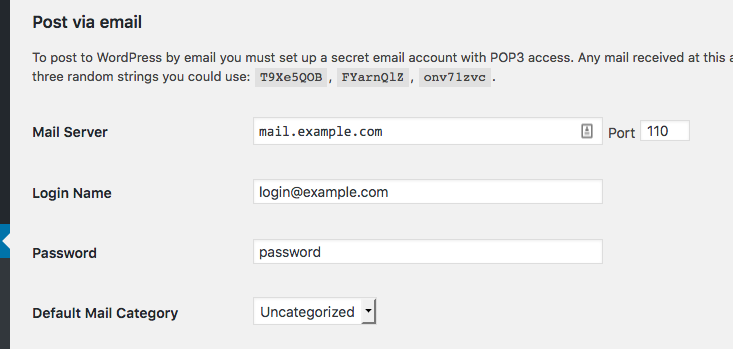
Hi, do you have post by email activated on http://thinkingmomsrevolution.com/? Go to the dashboard for that site and to Settings > Writing, and if it is not active, you should see something that looks like this: https://cldup.com/Vu3RNDeyHC.png
-
We do NOT have it activated. Sounds like a good idea, given what happened and the in/out of our earliest founders. Is there a link that describes in detail have this works? It is not fully described in the set up (to a layman). I want to be sure the editor and Director have a clear idea of how to execute. Thank you.
-
I’ve done some digging. Post by Email isn’t active..
You mentioned two emails. What were the two posts that were listed? Can you send the links that were included in the notification emails?
Also, can you list an address that got a notification?
-
This is the link to the blog that was included in the email – it was the same in each email b/c the blog was posted then deleted then posted again – and then deleted again. All several hours apart. Then I posted for a third time as I tried to figure out what had happened.
http://thinkingmomsrevolution.com/hello-world/One address that got a notification was: (email visible only to moderators and staff)
-
-
It sound like (and it’s the most logical explanation) that a user on your site published those posts. If you do not recognise the username, it means it’s someone unauthorised to access your dashboard, so either someone who managed to hack into your site or an admin account on your site, or someone that was added by another admin on the site.
As your site is using the open source WordPress software, not WordPress.com, we have no control over user accounts on those sites, and no access to your dashboard, so I have no way of confirming this, though.
I suggest you go through your site’s user list and remove anyone who shouldn’t be there, consider changing any admins who don’t actually need to be admins to editors, editors to authors, and authors to contributors, and make sure all users on your site update their passwords for both their accounts on your site and their email accounts.
For any more help with this, please ask in the self-hosted WordPress forums, as that’s the best place for support with the version of the WordPress software you are using.
https://wordpress.org/support/
The emails came from us because you have the Jetpack plugin set up on your site and that plugin allows people to subscribe to email notifications of new posts. But we have no control over how posts are published on your site or who has permissions to do that – that is controlled on the site itself.


- The topic ‘unauthorized blog notification’ is closed to new replies.
 WordPress.com Forums