Updating email–don’t want a ‘domain’ just to comment and reply on blog posts by those using wordpress
-
Somehow, this has gotten far more complex than I bargained for. I simply want to be able to ‘like’ or ‘comment’ on WordPress blog posts. However, somehow it insisted that I should have my own ‘domain’ and had me sign up for my own blog, even though I don’t want one. When I try to log in using Google, for example, WordPress pops up and insists I sign in through THEM. I want to update my email info, but can’t see a way to do it in a simple, straightforward way. To repeat, I do not want my own domain/blog, I just want to be able to comment/reply on other people’s blogs. Thanks for any help you can offer.
The blog I need help with is: (visible only to logged in users)
-
I will type modlook into the sidebar tags on this thread for a Staff follow-up. How do I get a Moderator/Staff reply for my question? https://en.support.wordpress.com/getting-help-in-the-forums/#how-do-i-get-a-moderatorstaff-reply-for-my-question
-
Hi @teedee126, while logged into your account, you can go to https://wordpress.com/me and edit your account profile and settings, including your email address.
If you do not want the blog, that can be deleted as explained here: https://en.support.wordpress.com/delete-site/
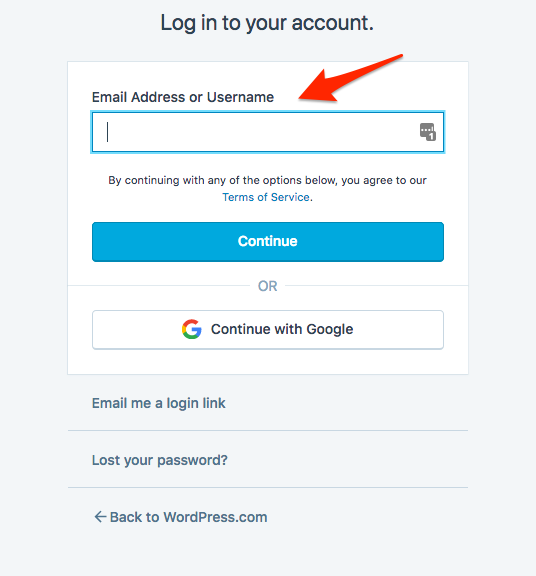
When logging in, enter your email address and click continue. Then enter your password on the following screen. Screenshot: https://cldup.com/paueQbMteq.png
Let us know if you have any problems.


- The topic ‘Updating email–don’t want a ‘domain’ just to comment and reply on blog posts by those using wordpress’ is closed to new replies.
 WordPress.com Forums