

WordPress.com hosting plans include one free year of domain name registration. This guide will show you how to renew your domain name after the free year has passed.
In this guide
Have a question?
Ask our AI assistantAs long as auto-renew is set to ON, you will keep your domain name, and it will renew itself automatically before it expires.
If a domain name expires, it can be difficult and costly to recover, and there is a risk that someone else may register the domain name before you. For these reasons, we recommend keeping automatic renewal turned ON under the “Subscription Renewal” section:

Domain names renew at the same price each year. View domain name pricing.
You can renew a domain name manually, as long as it is outside the refund window for the domain name. If you wish to renew your domain name manually once it is outside the refund window, follow these steps:
- Visit your Purchases screen.
- Find your domain registration in the “Active Upgrades” list and click on it:

- Click the “Renew now” button at the top right or the bottom of the page:
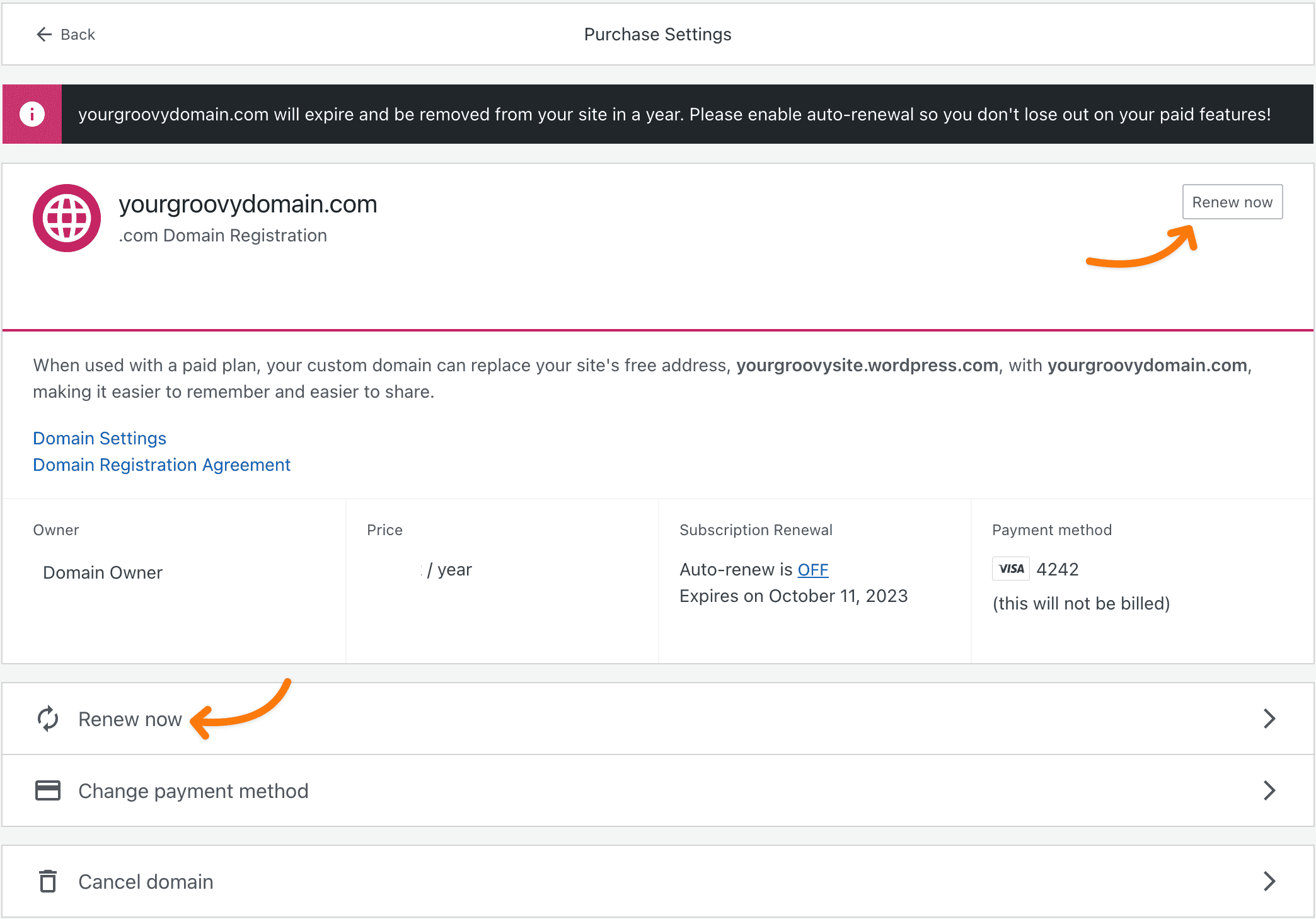
- You’ll be taken to the checkout screen to complete your purchase. View domain name pricing here.
- On the checkout screen, you can manually renew domain names by multiple years at a time by selecting additional years from the renewal duration drop-down box.
- Most domain names can be renewed for up to a maximum of ten years.
- For example, if your domain name is already valid for two years, you can renew it for up to eight more years.

- Complete the checkout screen to pay for your renewal, which will renew your ownership of the domain name.
Renewing a domain name is a separate action from renewing your site’s hosting plan, so make sure to renew your plan as well to ensure your website remains accessible at your domain name. Alternatively, you can cancel your plan while keeping your domain name registration active by renewing the domain name only.
Only the account that owns the domain name can renew it. If your domain name is owned by another administrator on the site, ask them to renew the domain name or transfer it to your account.
If your domain name has already expired, and you cannot renew it using the steps above, visit our guide to expired domain names.
If you do not want to own your domain name any longer, you can let it expire and not renew it. This means your domain name will be canceled, and you will lose the right to use it with WordPress.com and any other service.
To ensure your domain name does not renew, take the following steps:
- Visit your Purchases screen.
- Select your domain registration.
- Check under “Subscription Renewal” where auto-renew will be set to ON or OFF:

- If auto-renew is enabled, you will keep your domain name. To let your domain name expire, click the underlined “ON” link to confirm you wish to turn off automatic renewal.
- With auto-renew set to OFF, your domain name will expire on its expiry date. You will not be charged again.
By canceling auto-renewal, your domain name will expire on the expiry date stated in your account and will not renew again. Once your domain name expires, there is no guarantee that you’ll be able to get it back—it could become unavailable and impossible to purchase again with WordPress.com or at any other domain registrar.
