

You can embed (i.e., display) videos, social media posts, maps, songs, and many other types of content from many different sites, including YouTube, Facebook, Instagram, and many more platforms. If you are having trouble with getting an embed to display, this guide covers the most common reasons and what you can do to solve them.
Many types of content can be embedded by pasting a link into the WordPress editor.
For a link to successfully convert into an embedded piece of content, it must be pasted on its own line with no other content. This means there should be no text, characters, or even a single space before or after the link, as shown below:
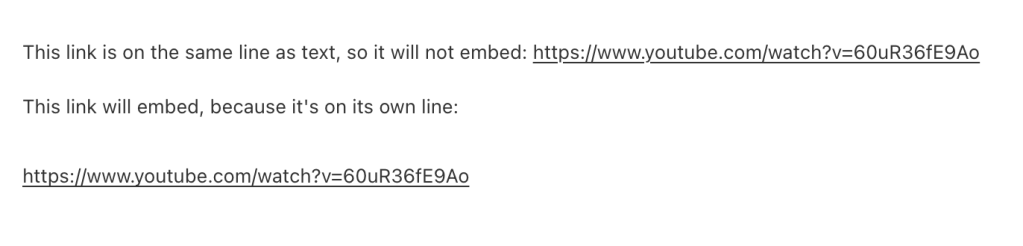
For a link to successfully convert into an embedded piece of content, it must be pasted in plain text and not hyperlinked.
You can tell if a URL is hyperlinked by clicking on it. When you click on the URL, if a link box with the option to edit appears (like in the screenshot below), it means your link is hyperlinked.

You can remove this hyperlink by clicking on the link icon (the symbol that looks like a literal chain link) that has a line through it. The link will be plain text and will convert to an embed if link embeds are supported for that platform.
Changing the alignment of your embed link or code (centering it for example) or adding style elements will generate HTML formatting around the embed URL, causing the embed not to work correctly. Remove any formatting so that what remains is a plain text link.
Not all content from supported platforms can be embedded. There are two common reasons a link from a supported platform may not work:
The content is private or restricted. Private posts on Facebook, protected posts on X, and private videos on Vimeo will not embed — only publicly accessible content can be displayed. If you see “Sorry, this content could not be embedded,” check that the content is visible to anyone without logging in.
The content owner has disabled embedding. On platforms like YouTube and Vimeo, the content owner can turn off embedding for their videos. In these cases, you can still link to the content with a regular link or a button.
Even on supported platforms, only links to individual pieces of content can be embedded — not every URL will work. For example, you can embed a specific Facebook post, but not a Facebook page, event, or group:
❎ Not supported: https://www.facebook.com/WordPresscom/ ✅ Supported: https://www.facebook.com/WordPresscom/posts/10158293614523980
❎ Not supported: https://www.instagram.com/wordpressdotcom/ ✅ Supported: https://www.instagram.com/p/B-hfomaFX55/
Make sure you are pasting the URL to a specific post, video, or photo — not to a page, profile, event, or group.
Some URL formats won’t be recognized even when the platform is supported. Common issues include:
- Mobile URLs: Links starting with
m.facebook.comorm.twitter.commay not embed. Use the standard desktop URL instead. - Domain variants: Some platforms have changed domains (for example,
x.comandtwitter.com). Try the format listed in the supported platforms list. - Extra parameters: URLs with tracking parameters or other additions may not be recognized. Try removing everything after the main URL path.
Embeds are supported from a long list of platforms. If a platform isn’t listed — like Canva, Google Maps, or SlideShare — the Embed block won’t recognize the link. On any paid plan, you may be able to use the platform’s embed code in a Custom HTML block instead, or look for a supported plugin that allows you to show the information you want to embed.
