

This guide will show you how to edit or delete existing DNS records on your domain on WordPress.com.
In this guide
Have a question?
Ask our Support AssistantIn this video, you will learn how to find, add, edit, and delete DNS records on WordPress.com, and what to check if your changes do not work as expected.
Your domain’s DNS records are controlled by the name servers set on that domain:
- If your domain’s name servers are set to WordPress.com, you can view and manage your domain’s DNS from your WordPress.com account using the steps below.
- If your domain’s name servers are set to another domain provider, your DNS records are controlled in your account with that provider.
- If your domain name is suspended because its contact information hasn’t been verified, you can’t change its DNS records until you verify your domain contact information.
You may want to edit the DNS for your domain if you need to:
- Add DNS records to verify ownership of a domain with search engines like Google.
- Add DNS records to verify your domain on Mailchimp, MailerLite, Mailgun, SendGrid, and similar email marketing platforms.
- Add MX Records to set up a custom email service with a third-party provider.
- Add A, CNAME, or other DNS records to point your domain to a different website hosted elsewhere.
- Create a subdomain.
- Change or remove existing DNS Records.
To change an existing DNS record on your domain, take the following steps:
- Visit your site’s dashboard.
- Navigate to Upgrades → Domains to see all the domains associated with that site.
- Click on your domain.
- Select the “DNS records” option and click the “Manage” button.
- Click the three dots next to an existing record and select the “Edit” option:
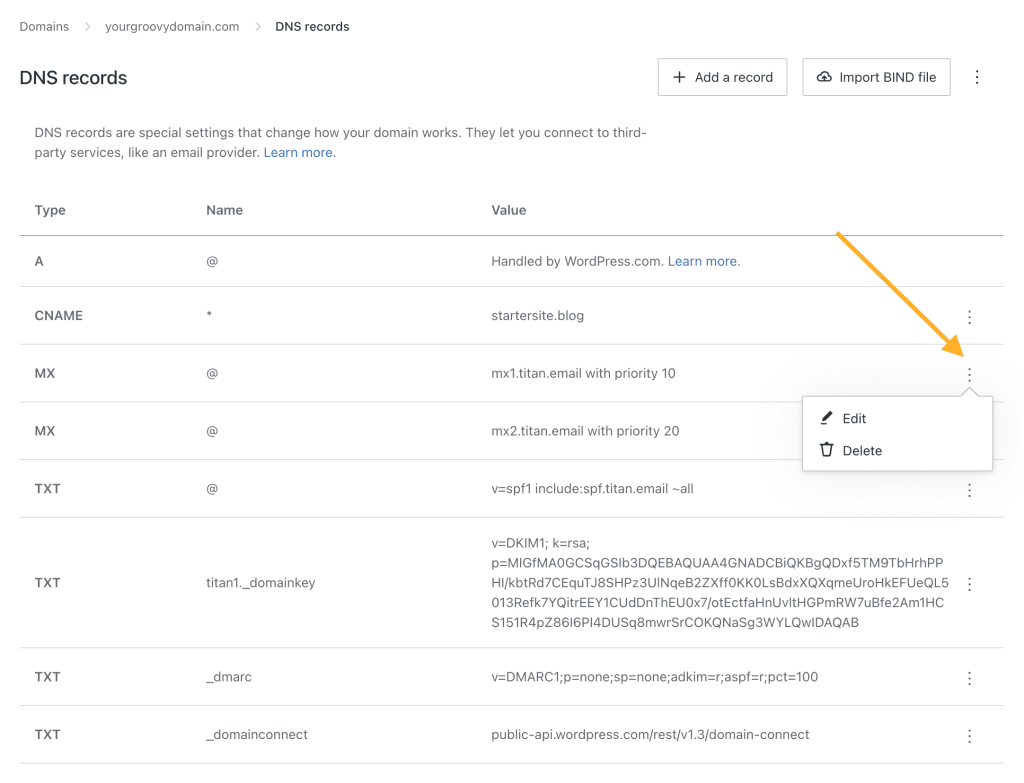
- Update the information on the DNS record as needed. The fields available change depending on the record type you are editing (A, CNAME, and so on).
- Click the “Update DNS record” button to save the change.
- Visit your site’s dashboard.
- Navigate to Upgrades → Domains to see all the domains associated with that site.
- Click on your domain.
- Select the “DNS records” option and click the “Manage” button.
- Click the three dots next to the record you wish to delete.
- Click on the “Delete” option.
